
Reviews
Shade by Shade Coloring succeeds in creating a genuinely relaxing experience. The absence of timers and scores removes all stress, allowing players to focus purely on the act of coloring. The tool set is intuitive, with a useful magnifier for detailed areas. The image variety keeps things interesting, and the ability to save and share work adds a nice touch. It is an ideal app for unwinding after a busy day or for introducing young children to digital art in a safe, controlled environment.
Description
Gentle Creative Flow
Shade by Shade Coloring focuses on the simple pleasure of adding color to black-and-white outlines. There are no timers, no scores, and no penalties for straying outside the lines. This design encourages players to relax and enjoy each stroke. The experience is similar to using a physical coloring book, but with the convenience of digital tools. Users can experiment with different color combinations without fear of making permanent mistakes. The process itself becomes a form of mindfulness, helping to quiet the mind and reduce daily stress.
Toolkit for Relaxation
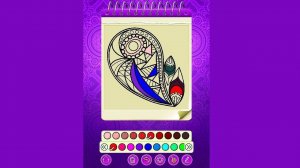
The game provides a straightforward set of tools. A color picker offers a broad spectrum of shades, from soft pastels to vibrant tones. Pen thickness can be adjusted to cover large areas quickly or to add fine details. A magnifying glass feature allows for precise work in small spaces, such as the petals of a flower or the wheels of a vehicle. The interface is clean, with large icons and minimal text, making it accessible to young children and older adults alike. Every action is reversible, so there is no need to worry about mistakes.
Diverse Image Collection
Players can choose from a variety of line drawings that include animals, vehicles, numbers, and everyday objects. The collection is designed to appeal to a wide range of interests. Animal lovers might enjoy coloring a cat or a bird, while those who prefer transportation themes can work on a car or a truck. The variety ensures that there is always something new to try, keeping the activity fresh over multiple sessions. Each image is carefully drawn with clear outlines, making it easy to see where each color should go.
Sharing Your Work
Once a drawing is complete, players can save their artwork directly to their device. This feature allows users to keep a personal gallery of their creations or share them with family and friends. The ability to download finished pieces adds a sense of accomplishment and provides a way to look back at progress over time. It also makes the game suitable for children who want to show off their work to parents or teachers. The sharing process is simple and does not require any account setup or internet connection.










Comments
Sign in to leave a note
You must be logged in before posting a review or rating.
No account? Create one
No comments yet. Be the first to comment!